


Review: Laowa 15mm Shift G mount lens
Review: Laowa 15mm Shift G mount lens
An ultra wide medium format shift lens

No more Google ads. Too many deceptive and irritating adverts.
Any ad links left are non tracking, to companies we know, trust and we've worked with for years [Park Cameras]
Ads helped pay for site running costs, so if you found something useful, please
...Make small KoFi donation?
...Subscribe to Keith's YouTube Channel
...Get Keith's book about how to use tilt/shift lenses
Our site contains affiliate links - these help support the site. See our Advertising policies for more
Keith has been testing the G mount medium format ultra-wide Laowa 15mm f/4.5 shift lens for this review.
The lens is in Laowa’s Zero-D range and although it’s got the 14 blade aperture, it’s the same optically as the [5 blade version] Laowa 15mm shift lens Keith tested for Canon EF mount some time ago.
There are lots of examples of it in use, tested here on the Fuji GFX100S [102MP]
For more information and examples, see the original review
The 15/4.5 is directly available from Venus Lens The lens is available in several mount options: Canon EF, Nikon F , Canon RF, Nikon Z and Sony FE as well as the Fuji G mount shown here. As ever, if importing from overseas – check for taxes and import costs.
Index

See Keith’s 31min video review
The Laowa 15mm Shift G mount lens
When I tested the EF mount version, I noted how 15mm is a short focal length. Using the lens on the Fuji GFX100S with its medium format sensor [the smaller 33mmx44mm version of ‘MF’] gives a field of view roughly equivalent to ~12mm on 35mm.
Whilst the MF version of the lens has the same ±11mm of shift available, practical limitations limit usable shift to ±8mm. I’ll discuss this in more detail later, but you are getting the maximum field of view equivalent to some 9-10mm.
I’d suggest ignoring these numbers and just looking at how wide some of the example shots are throughout the article.
Such width comes with advantages in what you can cover with it. It can also make composition tricky with those ultra-wide views.
If you’re unsure just how useful shift is, have a look at my article: How to use lens shift
There are many (60+) articles, reviews and videos looking at all aspects of tilt/shift lenses, See the Tilt/shift Index page for links to all, including my book about using such lenses.
There is a special lens mounting bracket available for this lens and the 20mm shift. This was not available when the 15mm was tested. I’ve covered it in its own adapter review.
I’ll look at examples of using the lens later, but first a look at the lens itself.
Laowa 15mm Shift G mount lens
The lens is solidly made with metal parts and a distinctive curved front element – see the original 15mm shift lens review for more images
Note: You can click on most images here to see larger versions. Images have been reduced in size for this web article, They have also had minimal sharpening, so take heed before deciding that the lens is ‘soft’. Also I only have one copy of the 15mm so take this review as an indication of the sort of quality you should expect, not a rigorous optical analysis.
Here’s the lens:

It’s optically the same as the 15mm I looked at on my 5Ds.
Note, it’s somewhat longer for the mirrorless Fuji G mount. The red ring signifies a 14 blade aperture, rather than the 5 blades of the ‘blue ring’ version. This means much less prominent ‘sunstars’.
This is the EF mount 5 blade version.

The protruding front element is protected with a solid lens cap.
The lens is manual focus. It has a long enough focus throw [~110º] and focused very easily with focus peaking enabled on the [mirrorless] GFX100S.

The aperture ring directly stops down the lens with clicks at full stops.
Shift mechanism – 15mm Shift G mount lens
Despite the mount differences with the 15mm shift G mount lens, the basic construction is the same.
Further down can be seen the lock for setting the lens shift. Shift is via the lens ring directly above the knob. You rotate this ring and the lens shifts along the set shift axis.

Below this is a tab that releases the lens rotation (shift axis direction) movement. This is shown by the red markings. It has stops at 15º intervals. I find this much more useful than the 30º steps for the Canon TS-E lenses, since 45º is an option.
There is a scale indicating the amount of shift in mm.

Diagonal shift

Vertical shift [rise]
Lens mount
Note the lack of electrical contacts on the lens. This is a fully manual lens. That means no lens EXIF data with your image files. So, no aperture info.

At zero shift, it’s just a good quality 15mm lens.
I prefer the version with the smoother aperture – not that I dislike the sunstars of the 5 blade aperture, I just don’t always want them…

Compare this with the 5 blade version I tested before.

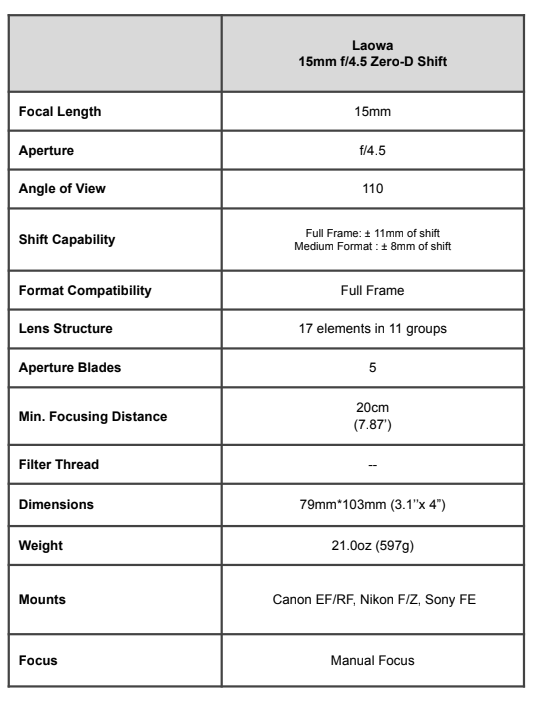
The lens specifications – 15mm Shift G mount lens
Note that this table is from the initial lens launch information and does not include the G mount version
Internally, the Laowa 15mm has quite a complex design, to minimise distortion and cover such a large image circle.

The image circle refers to the area behind the lens where it projects the image for your camera sensor to capture. This image is circular, and for a lens like this, much larger than is needed to just cover the sensor. When you shift the lens, a different part of the image circle is captured, giving the characteristic change in view associated with shift.
The difference inn coverage between 25mm and small medium format is shown here [diagram from Venus Lens]

There are no filters for this lens – I’ve used the EF->RF adapter with the Canon R5 and TS-E17, where the polarising filter can be useful. For the front, you’d need big filters and an adapter.
Vignetting
I’ve quite a detailed test of vignetting in the original 15mm review where I note the conventional fall-off towards the edges of the image circle.
By f/8 [as used on this shot, with no shift] corner vignetting is fairly low. It’s more noticeable than on an unshifted shot with a 35mm sensor, since that would be a crop of this image.

Much as I’d expect.
You’ll need to look elsewhere for people with the equipment to accurately measure how much vignetting there is, but with a simple sideways shift it looks easy to deal with.
This series of shots [4.5 / 5.6 / 8 / 11 / 16 / 22 L>R/ T>B ] is unshifted.

Now, what about strong shift?
I’ve deliberately chosen to go to 11mm up here. The specs say ±8mm, so I’m definitely expecting the top corners to hit the edge of the image circle.

There actually isn’t that much strong vignetting in the two top corners, where I’d expect to see it.
However, look at the bottom – vignetting which steadily gets worse as you stop down.
This is ‘shift vignetting’ and occurs to some extent in almost every shift lens I’ve tested – just not so obviously. It’s due to physical vignetting of the optical path somewhere inside the lens.
Now for 11mm of diagonal shift

Here the top right corner is very strongly vignetted, this is the absolute edge of the lens image circle.
Look at the lower left though. This is close to where the camera is pointed (see the first set above).
What’s causing this? A look at the back of the lens fully shifted show fairly clearly the cause of the shift vignetting.

If we look at the EF mount version of the lens we can see why it’s one of the few lenses not to show mount vignetting [see the review for detail]

It’s important to note that if you limit shift to ±8mm, the vignetting is much reduced.
However there are no hard/soft/click stops in the shift mechanism so it’s easy to push the shift a bit too far. If it were my own lens I’d like to see how well it performed without such a small baffle/aperture. If it’s needed for cutting down internal light reflection, how might it work better if fitted to the rear end of the optics tube rather than the mount tube?
Lest you think corner vignetting is a serious issue, these four shots are all at fairly strong shift and needed very small amounts of lightening in the upper [shifted] corners.


Lens detail
I don’t have the equipment (or multiple lenses) to do MTF charts (or patience/inclination if I’m honest).
The optics are the same as the EF mount lens I tested – given my 5Ds has ~50 MP in a 36×24 mm sensor and the GFX100S sensor has ~100MP in a larger [33 x 44 mm] sensor, there is not a huge difference in ability to capture detail.
The 5Ds has about the resolution of a ~85mp MF one, so the GFX 100S is not pushing things too much.
Of course, the MF sensor is including more of the image circle, so what would need shift to show on the 5Ds is there unshifted on the GFX100S.
These two shots show why I really like having the ability to add a bit of shift to images

It’s Ok, but a few mm of vertical shift [rise] makes all the difference (not for everything, but the option is good).

A quick look at 100% detail looks quite reasonable [click for 100%]

It’s the shifted corners where lens aberrations show up and the trees show a typical asymmetric distortion – typical of the off axis coma I’ve seen in several Laowa ultra wide lenses (this comes partly as a trade-off in lens design where there is extremely low chromatic and geometric distortion.
See my recent review of the Laowa 19mm f/2.8 Zero-D on the GFX 100S for more about such aberrations.

Fortunately, this kind of off-axis distortion is similar to some aspects of motion blur.
Applying Nik Sharpen AI, at a very low level, makes a massive difference.

With vertical shift the detail drops off in both top corners. At strong diagonal shift, the detail falls off considerably in the top shifted corner. This means that lens softness is not symmetrical in any shifted image.
My preferred sharpening solution for this is software that doesn’t assume the image is unshifted. At the time of writing, I’m getting best results with Topaz Sharpen AI (I have more examples in my Sharpen AI review).
Flare and CA
Allowing the sun into the frame give noticeable flare [See the other 15mm review for more examples]. However, with that front element, keeping the sun from shining on it makes a decided difference.

Here, shading the front element.

Chromatic aberration is slight, at just a few pixels, and easily fixed during RAW file conversion – the default ACR settings in Photoshop virtually eliminates it.
Using the lens
With no electronics, you’re going to be using a lens like this fully manually. If you’re inexperienced with manual operation, look on it as a way of thinking more what you’re doing, and an opportunity to better appreciate how light varies around you.
That said, you do need to use your camera for metering. For this review, I’m using the Fuji GFX100S, but in the previous review I tested it with both a 50MP Canon 5Ds DSLR and an EOS RP (26MP). There are more detailed observations about metering in that article.
The GFX100S metering for the lens worked just fine, with or without exposure simulation turned on. Setting the camera mode to aperture priority gave reliable results with or without shift.
The vignetting examples shown earlier were shot in Av mode at 100 ISO.
Focus
Enabling focus peaking made focusing a simple process, with direct viewing of the screen a distinct help for accurate focus. Using focus peaking and the inbuilt level made it very easy to use the camera and 15mm hand held, even with strong shift.
80% of the images in this review were taken hand-held. The image stabilisation of the GFX100S works a treat.
Medium format photography with the 15mm Shift G mount lens
15mm is a very wide angle lens for normal 35mm use and I’m going to assume that you’ve seen enough wide angle shots to appreciate the effect that it has on composition, lending prominence to close up subjects and stretching corners, as a result of the wide rectilinear projection. If such short lenses are new to you, have a look at some of my other lens reviews for examples of non-shifted images.
- Laowa 19mm f/2.8 on medium format GFX100S
- Laowa 12mm
- Irix 15mm f/2.4
- Samyang XP 14mm f/2.4
- Samyang/Rokinon 14mm f/2.8
- Canon 11-24mm F4L
You’ll note that these lenses are somewhat faster than the f/4.5 of the shift lens. The main reason for this is that in order to use shift, the lens image circle needs to be much bigger than the sensor.
So, those f/2 designs only have to project an image big enough to cover a 24mm x 36mm sensor, whilst the Laowa image circle (65mm diam) is big enough to cover a medium format sensor. Designing, let alone making a high quality 15mm f/2 shift lens would be a real challenge. It would be huge and extremely expensive.
The Laowa 15/4.5 focuses down to 20 cm, and even at f/4.5 the background isn’t going to be really soft.

Next focused a bit further away

With focus a few feet from the camera, the DOF is huge (f/5.6)

Nope, this is not lens for soft dreamy blur… You get this one for the shift and width
Basic vertical shift with the 15mm shift G mount lens
The normal use of such wide shift lenses is to be able to get a wide view of a scene, without having to tilt the camera upwards. Tilting the camera upwards causes convergence of verticals, not usually a desired state with buildings or trees in a landscape.
See How to use shift, for a lot more about this.
 Now, this is not a hard and fast rule – strongly converging verticals can be a creative choice and give a dynamic feel to a shot.
This view of the viaduct (EF14mm F2.8L II) at John O’ Gaunt in Leicestershire is far more interesting than one using shift to keep the columns vertical.
I wrote an article discussing aspects of this several years ago: ‘Vertical lines and movement‘
The examples in this review are to show the capabilities of the 15mm shift lens, not to suggest that I would have necessarily used it for a particular client or subject.
I have shift lenses of my own at 17/24/35/55/90 mm and the choice of what to use and how much much shift is one of those things that ‘just depends’. Oh, and there are no prizes for using the entire frame, so with plenty of MP to spare, both cropping and stitching multiple shots are options.
A simple example of vertical shift (sometimes known as ‘rise’) is in this shot. Vertical shift has moved the horizon downwards in the frame, enabling the whole building to be captured without an expanse of flower bed in front.
Watch out for top corner vignetting though!

The VJ Patel building (VJP) at De Montfort University
Moving round to directly face the building lets me get this very strong single point perspective view.

Compare with a shot on a warmer day taken with the 15/4.5 shift on my EOS RP [not quite the same spot, slightly further back]

I know this looks quite extreme, but print it at 6 feet by 4 feet and stand a few feet from it, with your eye level matching the person walking by and it will suddenly seem very realistic. It is all just a matter of perspective.
It is very easy to give quite blocky buildings a ‘spiky’ feel that can be a bit too much. Moving back a bit (if possible) and using a longer focal length may help.


Sometimes the wide angle and shift just lets you get more of a scene in.
This backlit view of someone feeding the swans has the sun in the shot. Flare is reasonable and shadow detail testament to the dynamic range of the sensor in the GFX100S.

The lens works well in interiors too. Here, in Leicester market

I visited Leicester city centre on Christmas Eve – in previous years, a foolish endeavour unless you like dense crowds.

If you wanted an image summing up so much of the UK today – this empty scene says it for me.

A few views of a Georgian part of Leicester – This is not far from where King Richard III was found [under a car park].


Lens geometry and ‘fixing’ images for the 15mm shift G mount lens
Almost all the shots here are taken hand held, which even with the camera internal level, means that verticals can be a little off.
Here’s that shot above corrected in Nik Perspective Efex [see my Perspective Efex review for more]

If you look at the right hand edge you can see a bit of curvature – the lens does show a bit of barrel distortion.
Of course, this is an image with vertical shift, so the barrel distortion is not symmetrical.
There are ways of fixing this, but with no EXIF data, it’s going to be a manual process.
One technique I first tried when testing the Samyang 24mm tilt/shift lens involves extending the canvas in the opposite direction to the shift, so as to put the canvas centre on the centre of the image circle. Unfortunately, with no shift data in EXIF you have to guess the amount of shift
Here’s the extended image being corrected in the lens correction tool in Photoshop, with a bit of pincushion distortion added to neutralise the barrel distortion. Fortunately the lens has pretty low distortion levels and you simply won’t notice it in many shots.
It’s just that as an architectural photographer, I take a lot of shots with edges of buildings in them ;-)

The process is described in my Samyang 24mm review and my book… ;-)
My book looks at the many ways that tilt/shift lenses can benefit your photography from a technical and creative point of view. ISBN 9781785007712 Book available from all good bookshops
It also works for fixing vignetting – but at full shift, some more Photoshop work is needed and you’d better not have any detail in those top corners.
A shot of Belvoir Castle just before sunset – more vertical shift than recommended.

As a guide, with a level camera, you want the centre of the extended image to be at the level of your camera

There is only so much you can fix, before some finishing off in PS is needed.

Shifting and stitching
It may have occurred that a picture with no shift could be stitched with a shifted version. Especially since you’re not moving the camera.
This works really well. I regularly use it with and up/down shift to get ~80MP square images from my 5Ds. For the GFX 100S 150MP is reasonable. However the limited shift and extremely wide angle to start with makes this less of an advantage. See the many examples in the original 15mm shift review.
Conclusions – Laowa 15mm shift G mount lens
I’m quite used to using manual focus lenses with shift, and very quickly became comfortable shooting with the 15mm on the GFX100S
It’s essentially the same lens I tested in the previous review, but with a bigger sensor, so a wider coverage in any one shot. The reduced shift is something you need to remember though. A soft click stop on the shift mechanism at ±8mm would be helpful.
Build quality is solid – I like its heft… Controls are smooth and the focus throw is OK for such a wide lens. The 15mm Shift G mount lens has the usual optimistic depth of field scale – use for rough guidance only.
With the lens one you’d primarily use at smaller apertures, I noticed no field curvature at normal working distances.
I do have to note though that a very different view is not always a better view – expect quite a lot of ‘Hmm… interesting, but perhaps not’ shots as you experiment…

It’s easily sharp enough to use with the GFX100S – every time I see discussions about lenses like this I see concerns over whether it is sharp enough for 100MP. The pixel density is not much greater than my Canon 5DS.
Limitations come from the fall off in coverage at strong shift, along with internal vignetting, especially noticeable if you shift diagonally.
If you’re expecting to use strong shift and just basic software like Lightroom to process images, then expect potential disappointment. All the very best images I created needed some (easy) work in Photoshop. If you expect software based image correction like I see with the excellent Fuji 20-35mm, then move along, this is not the lens you are looking for.
Indeed, with the ultra wide angle field of view and shift, this is a lens that will reward those prepared to put in the effort to master it – if you want it all doing for you, then tough… ;-)
This is a location I’ve photographed for the building’s architects, I’ve taken a lot of photos inside and out, but the 15mm on the GFX100S gave me shots I’d never have considered – or if I had would have required stitching together multiple images

Both hand held…

Yes, this was a very enjoyable lens to test.
The lack of tilt wasn’t much of an issue for me. You get so much depth of field that many uses of tilt are redundant, and at f/4.5 the plane of focus is not going to be obvious if used to draw attention to subjects.
The only lenses near to this one are the Canon TS-E17mm F4L and Nikon PC-E19mm F4E (links are to my reviews), They do have tilt, but are a lot more expensive. The TS-E17 does work with an adapter on the GFX100S – I’ll be trying it in due course.
It’s good to see Laowa yet again pushing the boundaries with what is another relatively specialised lens.
A lens that will require practice to use effectively, but well worth the effort. 15mm with shift only seems excessive when you’ve room to step backwards, which for some of my work isn’t an option.
Currently listed available on the Laowa web site
A short comparison of fields of view
I’ve shots taken from about the same spot with my TS-E17mm and the Laowa 15mm
The 17mm is on 35mm whilst the 15 shows the EF mount and 15mm shift G mount lens.
I’ll revisit this when testing my TS-E17 and TS-E24 II with an EF->G adapter on the GFX100S some time.
First, the 17mm, shifted upwards as much as possible.

Next, the 15mm, on the 5Ds, shifted up by as much as possible.

Now the 15mm on the GFX100S shifted up fully [hand held]

That’s the difference the bigger sensor makes… I must admit I rather like the Laowa 15mm Shift G mount lens on the GFX100S
If you’ve any questions about the Laowa 15mm Shift G mount lens – please feel free to ask.
There is also a specific index page on the site with links to all Keith’s articles, reviews and videos about using tilt and shift.
–ooOoo–
Never miss a new article or review - Sign up for our occasional (ad-free) Newsletter
and please do subscribe to Keith's YouTube Channel

Other areas of our site that may be of interest...
All the latest articles/reviews and photo news items appear on Keith's Photo blog

Keith explains tilt and shift lenses
Keith has written a book that looks at the many ways that tilt/shift lenses can benefit your photography from a technical and creative point of view. If not in the UK check for import issues and maybe try an on-line bookshop. Keith has no connection with sales of the book.
ISBN 9781785007712
There is also a specific index page on the site with links to all Keith's articles, reviews and videos about using tilt and shift.
We've a whole section of the site devoted to Digital Black and White photography and printing. It covers all of Keith's specialist articles and reviews. Other sections include Colour management and Keith's camera hacks - there are over 1200 articles/reviews here...
Adverts removed