


Review – Two baryta papers RR Big Bend and Palo Duro
Review – Two baryta papers
Red River Big Bend 310 and Palo Duro 300

No more Google ads. Too many deceptive and irritating adverts.
Any ad links left are non tracking, to companies we know, trust and we've worked with for years [Park Cameras]
Ads helped pay for site running costs, so if you found something useful, please
...Make small KoFi donation?
...Subscribe to Keith's YouTube Channel
...Get Keith's book about how to use tilt/shift lenses
Our site contains affiliate links - these help support the site. See our Advertising policies for more
Keith has been looking at two baryta papers from the USA. Our normal paper reviews are limited to what we can get in the UK, but Red River paper kindly sent us some samples.
Big Bend 310gsm and Palo Duro 300gsm
The papers are tested on two printers
- Epson P5000 17″ pigment ink printer [P5000 review]
- Canon PRO-200 13″ dye ink printer [PRO-200 review]

About Big Bend and Palo Duro
The two papers are both semi-gloss photo papers with slightly different surface finishes.
Differences are most noticeable when reflecting light off the surface, as in this shot of two ICC profiling targets I printed (P5000 – pigment inks).

The Big Bend is slightly whiter than the Palo Duro and when checking with a violet laser pointer show us a small amount of optical brightener. Not much, but of importance for some users.

BB310 [left] shows more ‘glow’ – click to enlarge
Key features (from Red River paper)

Note how the 310 gsm Big Bend is thinner than the 300gsm Palo Duro. Paper weight is not the same as thickness.
Full details of the two papers can be found at Red River
My video overview of testing the two papers
ICC profiles and media settings
I’ve picked two very different printers to test these papers with. The Epson P5000 is a high end pigment ink based printer, whilst the Canon PRO-200 is one of the highest spec dye based printers.
I know from my reviews of each printer that the different inks do not behave the same way on the same paper. This was one of my key findings with my Epson ET-8550 review where the presence of a matt black ink with the other dye inks makes for some interesting results.
For colour printing I’m creating ICC profiles using i1Profiler and an iSis XL scanning spectrophotometer, with targets (on A3+ 13″ x 19″ paper) just short of 3000 patches.
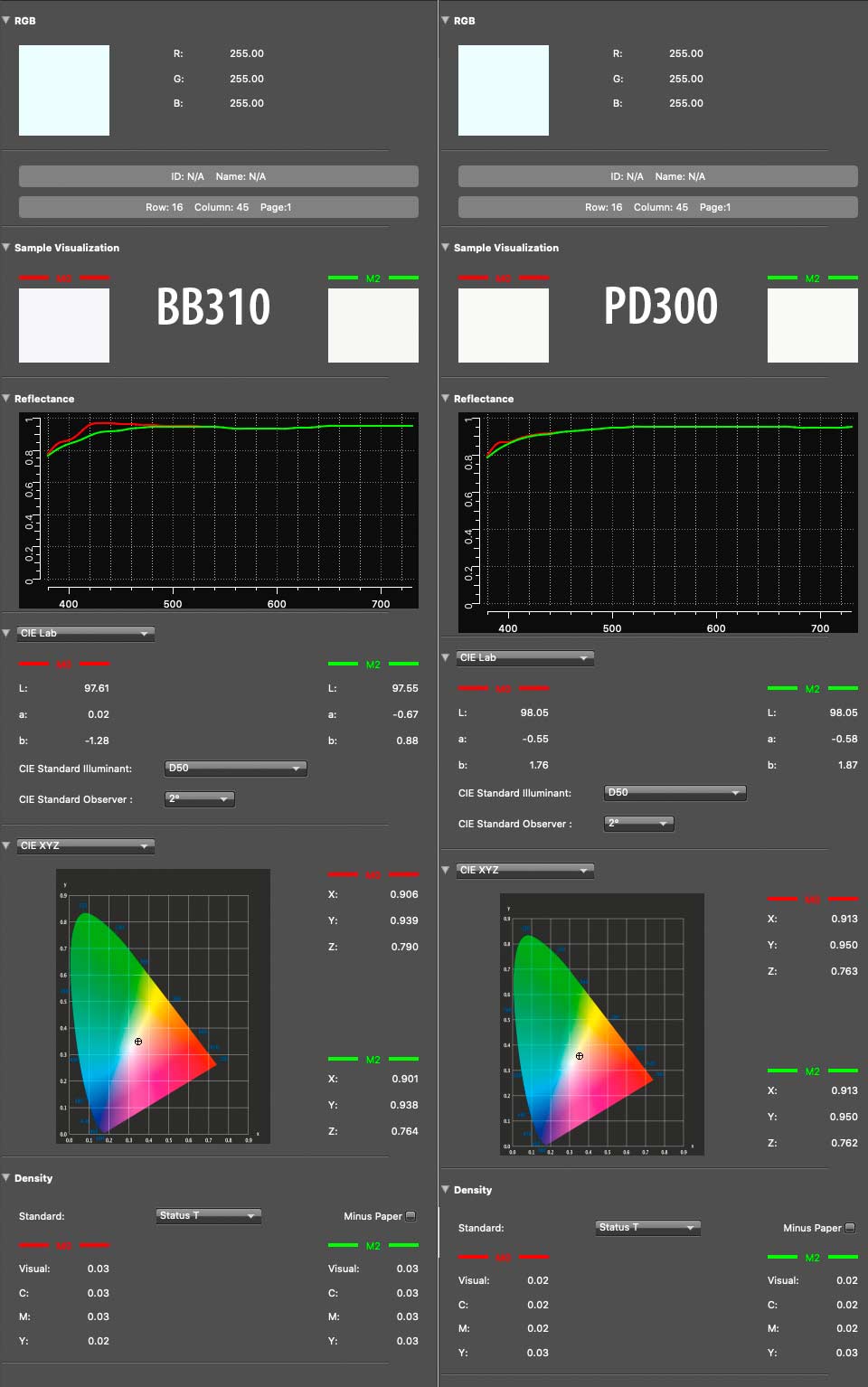
The measurement data for this setup is recorded with and without UV measurements. Looking at the spectral data shows the greater OBA in the RR310 [the red line – click to enlarge]
What about black?
In the P5000, the RR310 give noticeably deeper blacks

Looking at the PRO-200, the blacks are less dense. In particular, the drop in density at the red end of the spectrum characteristic of dye inks is quite marked.
Here’s the black response for PD300 on the PRO-200
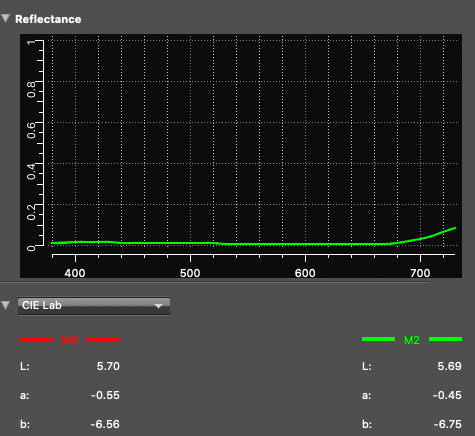
I’ll return to this when looking at B&W printing, but it’s partly why B&W prints with current dye inks are prone to look slightly different colours under different lighting (especially if any OBA is present).
What about colour gamuts?
As you’d expect, the range of colours available on the PRO-200 are going to be different to the P5000, but remember that this depends on the paper coating and how ink interacts with it. So, it’s rarely as simple as ‘pigments are better’.
If you want to test/examine the profiles I created, email me and they are available for non-commercial use. Red River also make profiles available for many different printers with their papers.
I’ll not include vast tables of data or diagrams here, since I’m firmly of the belief that without lots of caveats and explanations, they don’t contribute much clarity.
Here’s a side view of the gamut volumes of the PD300 on both printers.

That larger blue shape is the PRO-200 profile. On this paper the P5000 does not do nearly as well in deep colours.
Am I saying the P5000, with all its inks gives a smaller gamut than the PRO-200 with the PD300?
No – looking at the gamut volume from a different angle shows that in other colours the P5000 [wireframe] does better.

That’s with the Palo Duro
However, for the Big Bend, the P5000 definitely outperforms the PRO-200 in lighter colours

As ever the full relationship is more complex – if you want the profiles to test for yourself, let me know.
What do I take away from this? The PD300 surface/coating is better suited to the inks of the PRO-200. It also confirms my impression from looking at quite a few printers that dye inks on ‘baryta’ papers tend to give more variable results.
See the video above for more about the subtle differences between the papers and printers.
Black and white for the two baryta papers
For B&W testing I have a special test image, which includes a strip quickly read with my iSis spectro.
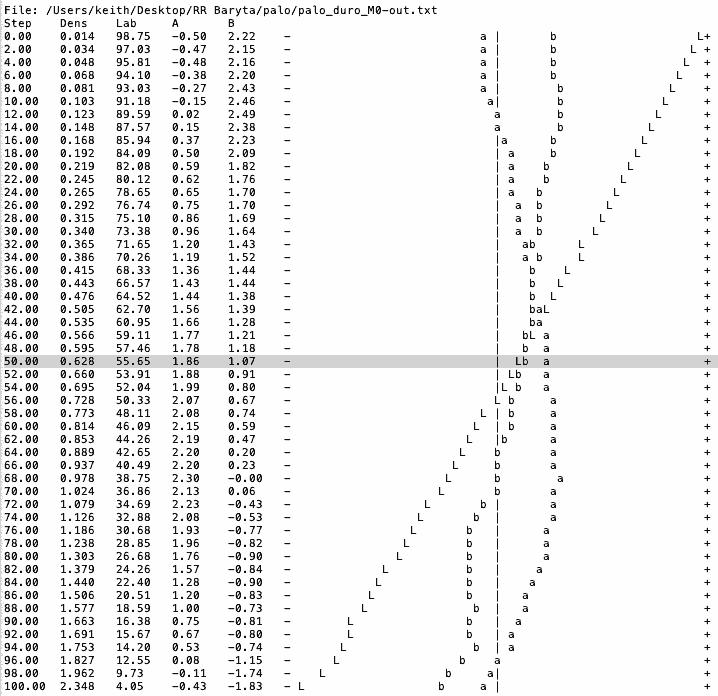
The important part of the graphs which follow is the lines of ‘L’s which give a feel for the linearity
Palo Duro 300 B&W
Shown for the two printers, using the black and white print mode for each driver
P5000
PRO-200
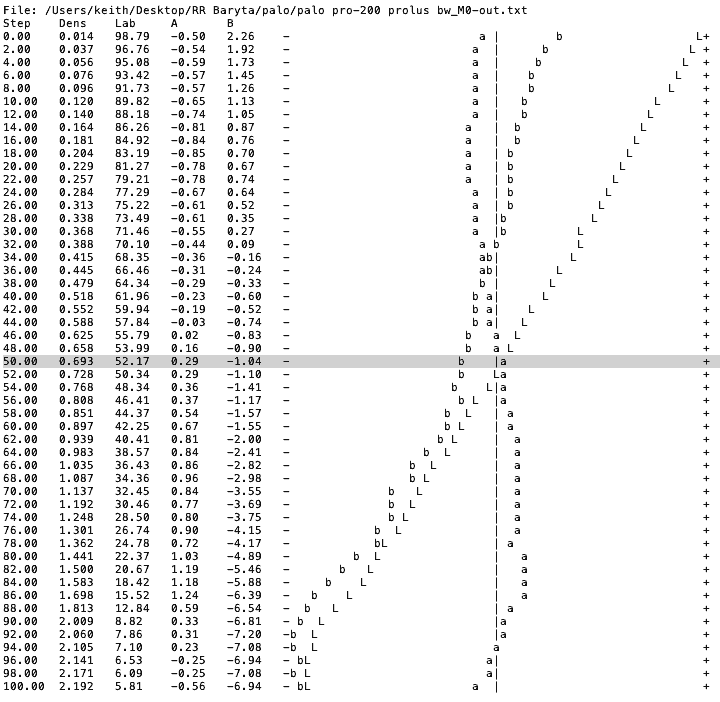
The P5000 shows quite a sharp dip from 98% to 100% and might benefit for a slight adjustment curve before printing. The PRO-200 is showing crunched shadows for blacks deeper than ~90% – a curve would help open up deep shadow, especially if the prints were not viewed under bright lighting.
Big Bend 310
P5000

PRO-200
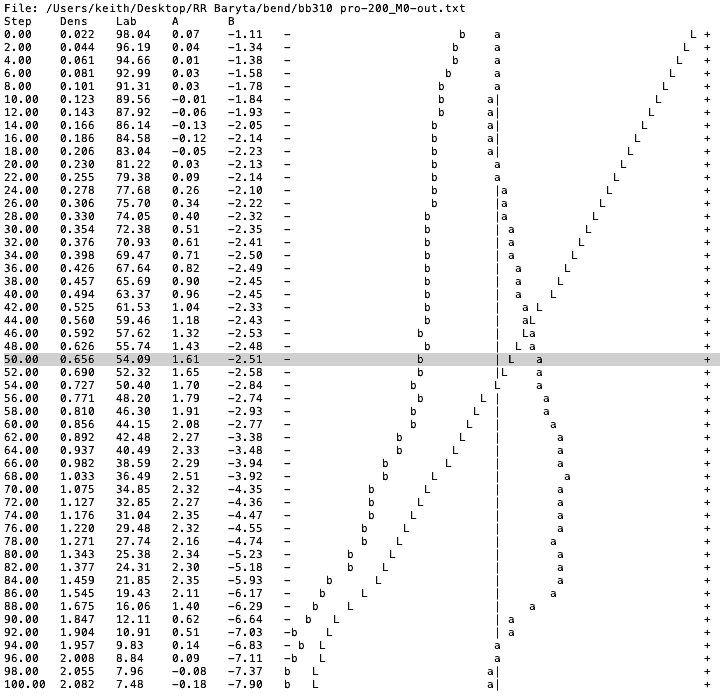
What I’m immediately seeing is that the blacks on the P5000 are deeper than with the PD300 and the blacks on the PRO-200 are not so deep. The PRO-200 is showing the influence of that black dye ink ‘red rise’ I noted earlier.
Both are relatively linear (B&W print modes) and would print many images just fine, The mid tones of the P5000 are coming out a tad light, but enough that I’d not notice in many images.
I also printed the test image using my icc profile for the RR310 on the PRO-200.
Neutrality is improved – but the variation looks a bit uneven and black depth is even less
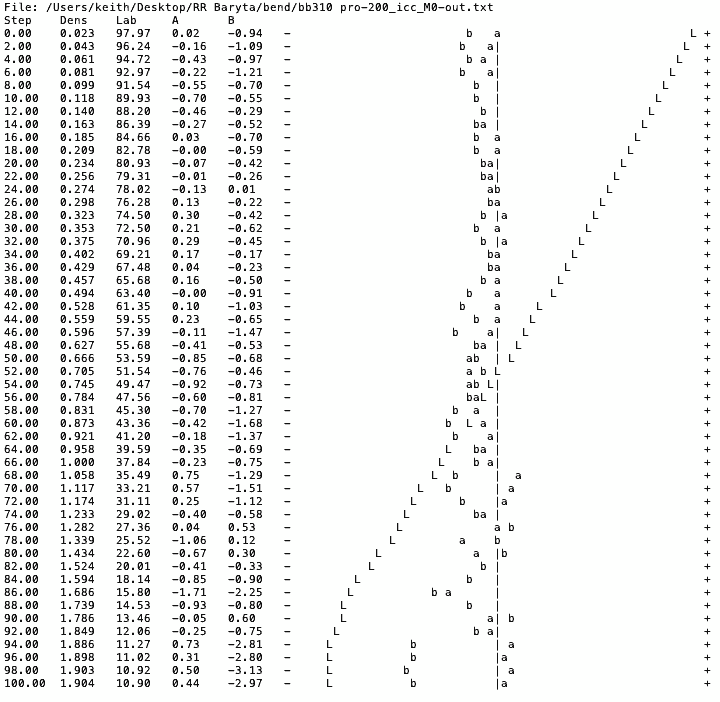
If you’re curious about using the test image to correct for non linearity in B&W printing, I’ve several articles covering the process, such as one describing how I set about using a new paper for printing.
Print Quality
Don’t let the graphs and charts put you off either paper – see the video for more about how they looked in ‘real life’

My preferred printer is the P5000 so naturally the Big Bend 310 would be my choice – it’s very close to a paper from my local [UK] paper supplier, which I’ve used for several years [Pinnacle Silk Baryta 310]
Summary – two baryta papers
Two excellent papers, which actually give a very good overview of the fact that it is the combination of ink/printer/paper which governs how a print will look.
So, if someone tells you a paper is great with printer XXX and you use printer YYY, then take their praise under advisement.
Thanks to Red River or sending the samples, and hopefully a paper review which is a bit more useful for our US readers…
-- --
Never miss a new article or review - Sign up for our Newsletter (2-4 a month max.)More print related information from Keith
...or use the search box at the top of any pageReference pages and test images
- Printer Test Images
- B&W printer test image
- Printer cleaning
- Paper reviews
- Printer info/news/speculation Canon | Epson
No more Google ads. Too many deceptive and irritating adverts.
Any ad links left are non tracking, to companies we know, trust and we've worked with for years [Park Cameras]
Ads helped pay for site running costs, so if you found something useful, please
...Make small KoFi donation?
...Subscribe to Keith's YouTube Channel
...Get Keith's book about how to use tilt/shift lenses
Our site contains affiliate links - these help support the site. See our Advertising policies for more
Keith | Dec 26, 2022 at 10:45 am
No
All my profiles are available on request, I leave it as an exercise for the reader ;-)
I never test manufacturer profiles form any source – I make my own profiles (with very high end kit) to see what the printer/paper can do.
Most OEM profiles are pretty good these days, but there is a limit as to how much ink/paper I want to use up ;-)
Jim Palmer | Dec 26, 2022 at 4:01 am
Did you do the same series of comparisons using the Red River supplied profiles and compare those results to your profiles? After all, most of us don’t make our own profiles for the papers we use. Thanks.