


Review – Topaz Glow V1
Review – Topaz Glow V1
Image editing plugin for applying artistic effects

No more Google ads. Too many deceptive and irritating adverts.
Any ad links left are non tracking, to companies we know, trust and we've worked with for years [Park Cameras]
Ads helped pay for site running costs, so if you found something useful, please
...Make small KoFi donation?
...Subscribe to Keith's YouTube Channel
...Get Keith's book about how to use tilt/shift lenses
Our site contains affiliate links - these help support the site. See our Advertising policies for more
Keith Cooper has looked at the Topaz image processing plugins in several reviews.
The plugin works as a standalone program or as a plugin. In this review, Keith tests it in Photoshop CS6 on an Apple Mac. It works almost identically on other platforms.
We’ve reviews of all Topaz software. See the Topaz Category in the dropdown menu at the top of the right column.
Article Index
Update: V1.0.1 fixes a problem with missing presets when Glow is used on non-admin accounts.
What does Topaz Glow do?
Buying from Topaz Labs
If you buy any software via this link (bundle or individual plugin), then we get a small fee (it costs you no more). Neither Keith Cooper nor Northlight Images has any other connection with Topaz labs whatsoever. We believe strongly in making any affiliate links like this clear.
Use our 15% discount code 'Northlight' for an additional discount on some promotions.
This latest plugin from Topaz labs is called ‘Glow’ and can apply a wide range of effects to an image.
The plugin is a bit difficult to characterise containing “more than 70 unconventional and quirky filters, with Glow you can alter your images using neon, graphic, liquid and other electrifying effects.”
It’s not dissimilar in its way of working from Topaz Impression, which I looked at recently.
It analyses your image for structural elements, particularly detail, edges and lines.
There are two main sets of controls for adding a ‘glow’ to the image, a primary and secondary set.
With other adjustments for colour and overall tonality, there are millions of combinations looking more or less different from your source.
Fortunately there are many preset options available, which give a quick way of testing the software and as starting points for what the settings can do.
This view of the Sonic Drive-in at Gunnison in Colorado has only a light application of the filter, but already has a very distinctive look.

Using the Plugin
I’m just applying the image to existing images in Photoshop, but once you get a feel for how the filter works it would not be unreasonable to alter some aspects of your source image before processing, since the plugin does its work globally to your whole image and you can’t alter the effect in different areas of the image.
The software opens your image in a new window, and by default offers a number of preset adjustment sets to choose from.

There are a number of before/after viewing options, such as this split view.

Or this side by side view.

There really is no better way to explore than to try out the presets on a number of different source images.
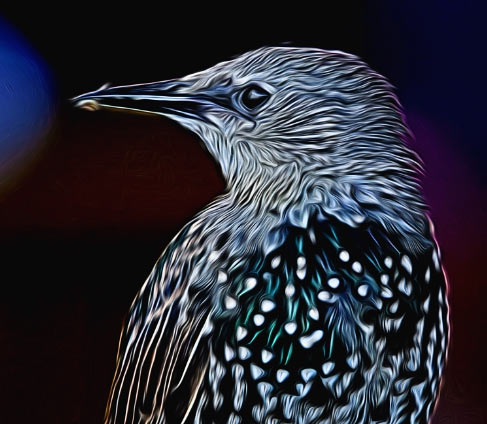
This version of the starling shows up how fine detail has a strong influence on results.

Some options blend more of image content.

Whilst others look for linear detail

This photo of a lily has very little detail in it (note the inset full size image available when you are zoomed in)

A more detailed view.

The presets are all grouped by style

Some examples from the ‘Neon’ collection.

Versions created from the presets are quite different and that’s before you go near the actual fine adjustment sliders.
I would normally suggest going through such filter options from the top, adjusting each in succession, but they all interact, so it’s going to be very hit and miss to start with.
One annoying thing that caught me out is the lack of an undo or history feature, so unless you save settings as a preset, there is no going back to the ‘nice effect I had from ten minutes ago”…
If you click on the starting adjustment name, it reverts all setting to that preset. The star next to the name shows that it has been altered from its initial settings.

Looking at a more usual photo of a building shows big difference from the bird photo.
Some more examples from the Sonic that used to be in Gunnison.
Glow type – Move your mouse over the image to see the effect.


Glow setting – Move your mouse over the image to see the effect.


I’ll round off with a few more preset examples.

A bit less abstract.

A softer look

Enhancing line detail

Hopefully that gives a feel for what you can do with this plugin.
Conclusions
Buying from Topaz Labs
If you buy any software via this link (bundle or individual plugin), then we get a small fee (it costs you no more). Neither Keith Cooper nor Northlight Images has any other connection with Topaz labs whatsoever. We believe strongly in making any affiliate links like this clear.
Use our 15% discount code 'Northlight' for an additional discount on some promotions.
An interesting plugin to try out, given my normal styles of photography.
I love the effects, but just can’t think of any particular personal use for them, but I know that a lot of people do like manipulating and altering photos though.
For greatest flexibility I’d want to use the plugin on multiple layers, so that I could alter the type and amount of effect applied to different parts of the image, but that’s something you really need to do in Photoshop.
The plugin works quickly, but with really high resolution images expect to wait a bit for what is very complex processing.
For me, missing features are primarily, any history options and the lack of a setting to return the results of the filter as a new layer in Photoshop, but this is V1.0 of the software.
If you like giving a very different feel to images out of your camera (or phone) then give the free demo a look.
There is a fully functional 30 day demo version of the software available.
We’ve reviews of all Topaz software. See the Topaz Category in the dropdown menu at the top of the right column.
Move your mouse over the image below to see a very different view of this Pacific sunset…


Summary
Software plugin that can apply a wide range editing effects to your images
Many preset image styles, and adjustments give a huge range of options/
System Requirements:
- Mac OS X 10.8+
- Windows 7+ x64, OpenGL 3.2
There is more information at Topaz Labs
Never miss a new article or review - Sign up for our occasional (ad-free) Newsletter
and please do subscribe to Keith's YouTube Channel

Other areas of our site that may be of interest...
All the latest articles/reviews and photo news items appear on Keith's Photo blog

Keith explains tilt and shift lenses
Keith has written a book that looks at the many ways that tilt/shift lenses can benefit your photography from a technical and creative point of view. If not in the UK check for import issues and maybe try an on-line bookshop. Keith has no connection with sales of the book.
ISBN 9781785007712
There is also a specific index page on the site with links to all Keith's articles, reviews and videos about using tilt and shift.
We've a whole section of the site devoted to Digital Black and White photography and printing. It covers all of Keith's specialist articles and reviews. Other sections include Colour management and Keith's camera hacks - there are over 1200 articles/reviews here...
Adverts removed