


Luminar Neptune review update
Luminar V1.2 ‘Neptune’ review update
Updated performance and features for MacPhun Luminar

No more Google ads. Too many deceptive and irritating adverts.
Any ad links left are non tracking, to companies we know, trust and we've worked with for years [Park Cameras]
Ads helped pay for site running costs, so if you found something useful, please
...Make small KoFi donation?
...Subscribe to Keith's YouTube Channel
...Get Keith's book about how to use tilt/shift lenses
Our site contains affiliate links - these help support the site. See our Advertising policies for more
MacPhun has released a new version (V1.2) of their Luminar image editor.
It’s a free update for existing users.
Keith has reviewed many of MacPhun’s collection of plugins and editing software – There will soon be Windows Versions – see Luminar for Windows
[contentblock id=38 img=html.png]

Luminar – the ‘Neptune’ update
[contentblock id=39 img=html.png]First up, the blurb from Macphun…
New feature highlights in Luminar Neptune:
- Accent – AI-filter – Uses artificial intelligence to create stunning images with a single slider movement, tapping into the power of dozens of filters.
- Quick & Awesome workspace – A workspace consisting of the Accent AI, Saturation & Vibrance and Clarity filters. Great for achieving fast results in a fun and easy way.
- Plug-in integration with Creative Kit and Aurora HDR 2017 – Seamlessly access Macphun’s other photo editing tools you own with Luminar as the host application
- Brush, Gradient and Radial Gradient tools – Dramatically faster performance yields smoother selective editing.
- Vignette filter – Addition of Vignette Styles, Place Centre and Pre- and Post-Crop modes deliver even more flexibility to this popular photo finishing tool.
- Memory management – Increased overall performance for large files and 5+ simultaneous open images.
- User Interface changes – Extensive improvements to in-app animation and mode transitions make for a more pleasing editing experience.
- Crop tool update – Added the ability to specify custom crop ratios.
- Local history – Provision for reviewing separate history while in Transform, Denoise, Clone & Stamp modes helps optimise editing.
Using the software
Note: my original review is a lot longer and goes into much more detail about just how you might use Luminar.
If I fire up the standalone version (not the plugin I normally use from within Photoshop) I get a choice of modes from simple to ‘everything’

I note the terrible ergonomics for image editing shown in No.3 – that person is going to have back/neck/arm problems really soon ;-)
The software works pretty much as before (see my much longer Luminar review for stuff about layers and masking) but shows the definite refinements you’d expect from V1.0 to V1.2.
Whilst I’m in the stand-alone editor, I can also make use of my MacPhun plugins, such as here (click to enlarge), where I’ve used one of my Black and White Tonality Presets.

I can add any of Luminar’s filters to my stack (and save as a preset) These show up as new in V1.2
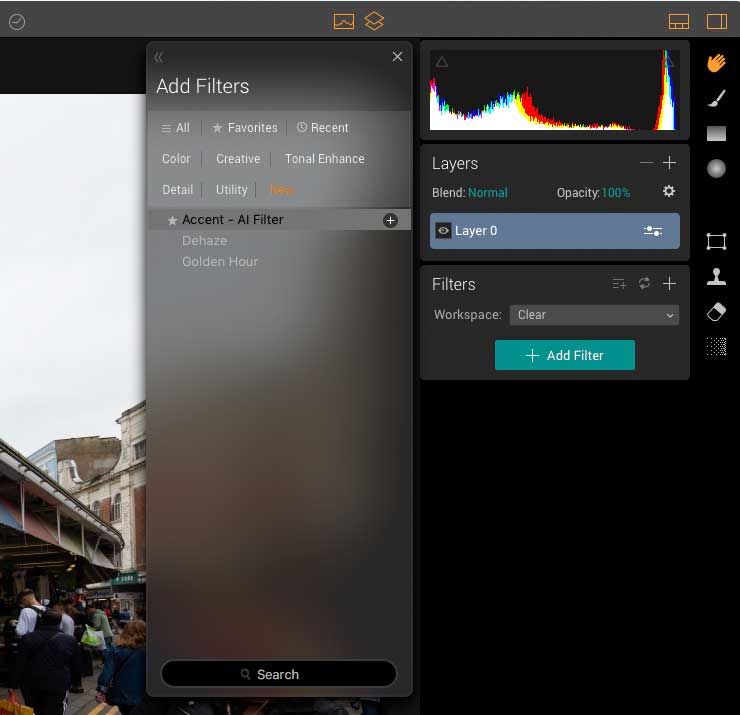
Accent and de-haze (from the V1.1 update) both work well at lower settings – of course you can crank them up for the more gaudy look preferred by many ‘sharing’ photos. ;-)
(2 images – click to enlarge)


Do be careful if you work on 8 bit (JPEG) images, since it’s easy to get posterisation.

To be fair though – this is a risk however you edit JPEG files if you push it too far.
As before, MacPhun have lots of tutorials and guides on their site.
More Luminar info
You can get $10 off when purchasing Luminar with discount code northlightimages10
For a short time there is a Luminar + video training, eBooks, presets and overlays combo package.
See also the Luminar + video training, eBooks, presets and overlays combo package (available for limited time, the code above will work with this package).
Never miss a new article or review - Sign up for our occasional (ad-free) Newsletter
and please do subscribe to Keith's YouTube Channel

Other areas of our site that may be of interest...
All the latest articles/reviews and photo news items appear on Keith's Photo blog

Keith explains tilt and shift lenses
Keith has written a book that looks at the many ways that tilt/shift lenses can benefit your photography from a technical and creative point of view. If not in the UK check for import issues and maybe try an on-line bookshop. Keith has no connection with sales of the book.
ISBN 9781785007712
There is also a specific index page on the site with links to all Keith's articles, reviews and videos about using tilt and shift.
We've a whole section of the site devoted to Digital Black and White photography and printing. It covers all of Keith's specialist articles and reviews. Other sections include Colour management and Keith's camera hacks - there are over 1200 articles/reviews here...
Adverts removed