


ImageNest on the Canon PRO-2000
ImageNest print layout on the Canon PRO-2000
Image layout and multiple copies

No more Google ads. Too many deceptive and irritating adverts.
Any ad links left are non tracking, to companies we know, trust and we've worked with for years [Park Cameras]
Ads helped pay for site running costs, so if you found something useful, please
...Make small KoFi donation?
...Subscribe to Keith's YouTube Channel
...Get Keith's book about how to use tilt/shift lenses
Our site contains affiliate links - these help support the site. See our Advertising policies for more
Earlier this year, Keith updated our reviews with a look at ImageNest V4
ImageNest is a Mac print layout package from Blue Cubit that we’ve covered over the years. If you need to lay out multiple images on paper with different sizes/crops/quantities, the software makes it very easy.
This short note shows it driving the Canon PRO-2000 printer, Keith reviewed over the summer.

Making a pile of prints
As part of our photography business I specifically choose not to deal with the general public, so no weddings or portraits or pets or babies.
However than doesn’t mean I don’t occasionally get asked to take the odd group shot for friends and family…
In this instance I’ve a photo of people at an event where everyone wants a 5″ x 7″ print – 20 of them.
Given I’ve got the Canon Pro-2000 here for some more testing, I thought it’s far easier printing all the photos on a bit of roll paper (even if my mother-in-law will end up cutting up the sheet ;-)
I tested ImageNest V4 earlier this year when I had the Epson P7000 here for review.
Setup involves adding the image (already at 5″x7″ 600ppi) and specifying 20 copies.
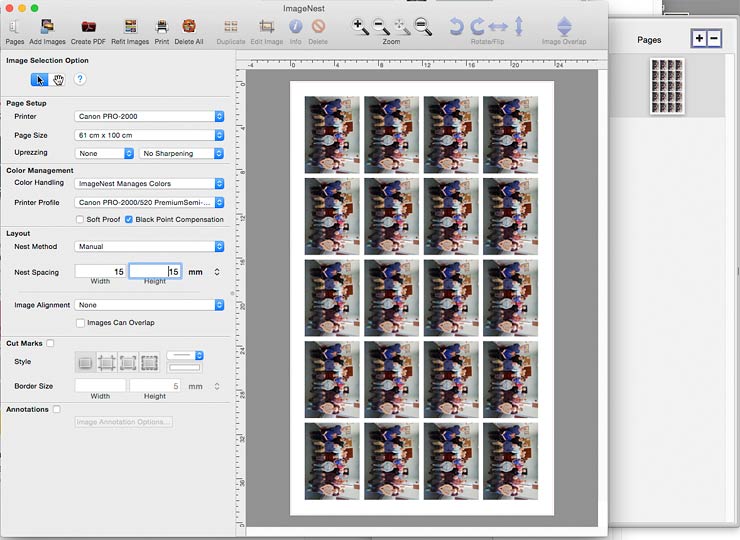
I’ve set a margin and centred the images. I’ve picked a paper length of 100cm, since it fits all 20 images on a single sheet.
ImageNest sorts out colour management – I don’t need any sharpening or its other features.
Not much later, here come the prints.

ImageNest 4 features
This from BlueCubit
| Automatic “Best Fit” Nesting
ImageNest will automatically arrange images and graphics to optimize paper usage. If manual layout is preferred we have that option too |
Export TIFF or PDF Album Sherpa with Export your template layout with Images to JPG, TIFF, or PDF files with ease and accuracy to whatever resolution you need |
| Vector and Raster (Image) file support
ImageNest is a PostScript RIP and can work with almost any file type Including EPS, PDF, and all Raster (JPG, TIFF, PNG, BMP, etc.) Formats. |
Black Point Compensation
Prints on Cotton Rag and other fine art papers benefit enormously from black point compensation. Strength of blacks, better shadow detail, and overall tonal range are greatly improved with BPC. |
| Annotations/Labels
Frames, Meta-Data, custom labels and other image or print data can automatically be added above or below your images or graphics. |
Drag and Drop
The easiest workflow there is. Files can be “dragged and dropped” directly onto templates or into the “Image Palette”. A fast workflow for using any template. |
| SoftProofing
See what is going to come out of your printer before you print. ImageNest can control ICC Profile, rendering intent, and Black point Compensation. |
Cropping/Editing
Resize or edit your images/graphics directly in the ImageNest layout. Quick and easy and includes advanced cropping, crop to size, and “Rule of thirds” cropping interface. |
I don’t do this sort of stuff, but here’s an example from the software developers…
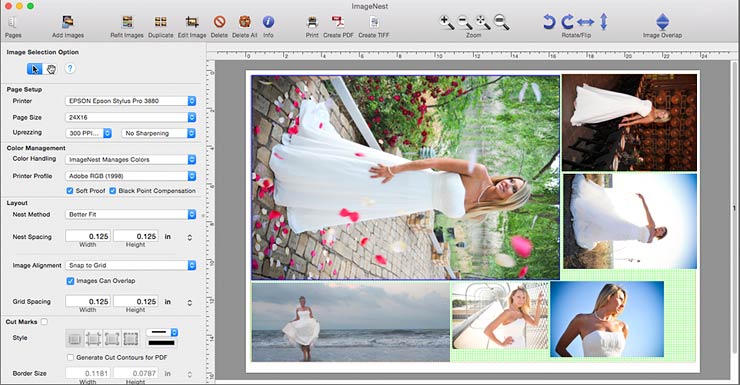
There is a free 15 day trial version of the software from BlueCubit
-- --
Never miss a new article or review - Sign up for our Newsletter (2-4 a month max.)More print related information from Keith
...or use the search box at the top of any pageReference pages and test images
- Printer Test Images
- B&W printer test image
- Printer cleaning
- Paper reviews
- Printer info/news/speculation Canon | Epson
Adverts removed