


Review – Template Sherpa photo layout software
Review – Template Sherpa
Quick and easy photo layout software (Mac)

No more Google ads. Too many deceptive and irritating adverts.
Any ad links left are non tracking, to companies we know, trust and we've worked with for years [Park Cameras]
Ads helped pay for site running costs, so if you found something useful, please
...Make small KoFi donation?
...Subscribe to Keith's YouTube Channel
...Get Keith's book about how to use tilt/shift lenses
Our site contains affiliate links - these help support the site. See our Advertising policies for more
BlueCubit have produced Template Sherpa, a very simple to use piece of software for Photo Album/Collage creation. Unlike many simple layout programs, this one includes full control over colour management and soft proofing.
We’ve used BlueCubit’s other software ImageNest for some time now, for layout, when printing a group of images on our large format printer. It’s just so much easier to use when we need to print a lot of smaller images on roll paper. It’s one more reason we don’t use a full RIP to drive our large printers.
Article Index

Photo Layout
As someone who prints mostly individual photographs on sheet or roll paper, my workflow usually stops when printing from within Photoshop. At Northlight, we don’t do wedding/portrait photography at all, however I do sometimes need to make promotional materials and other prints with multiple images on them.
The problem with many basic layout tools is just that – they are basic. The software you get with printers often falls into this category. Template Sherpa has been designed to be easy to use, and with enough flexibility to appeal to more advanced users too.
Using Template Sherpa
The software relies on templates – there are some examples supplied and you can edit/create your own.
When you’ve finished adding your photos and text, you export a file for subsequent printing (or sending it off if you don’t do your own printing).
Initially, I’ve opened up the example template that is installed.
The grey area is for an image – move your mouse over the image below to see what happens as I drag a JPEG image file to the box.
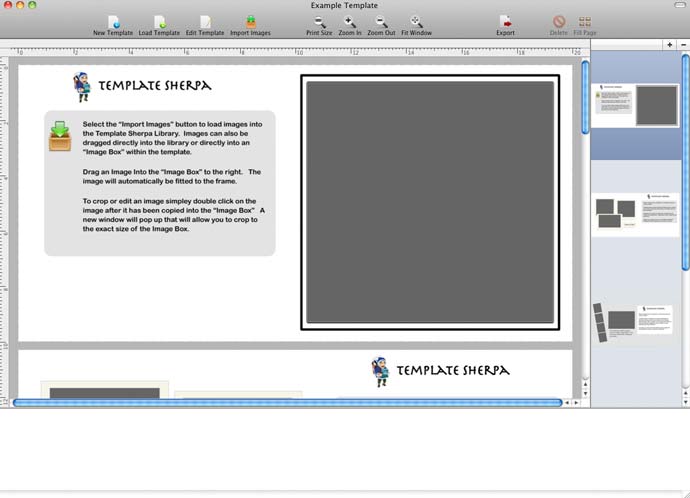

Note how the image also appear in the palette (library) at the bottom.
Pages can have multiple overlapping image layers and text boxes.

Each image can be opened in an editor to adjust cropping/fitting and apply basic image adjustment tools.
The default behaviour for fitting images is set when creating/editing templates – note that you can edit a template that has pictures in it.

The editor has a number of preset options for output sizes.

Images can be arbitrarily rotated too.

 I’ve just been doing this quick test with JPEG images, but the software supports a wide range of input formats (including transparency and layers support)
Images can be at different resolutions and have different embedded ICC Profiles.
Both RGB and CMYK images are supported.
Once you’re happy with the layout, the resulting document can be exported in a range of formats (JPG, TIFF, Single page PDF, Multi-Page PDF)
Some conclusions
The software is easy to use and effective. It’s Apple Mac only, and I did originally have some minor issues with running it under OS X10.6, rather than the newer 10.7/8 (10.7 or higher is listed in its requirements).
The inclusion of optional BPC (black point correction) and soft proofing allows for a lot more confidence in how prints will look, particularly if using matte fine art papers.
You might wonder about the incorporation of basic editing tools, but if for example you were printing a number of images on a heavy art paper, soft proofing might show some of them lacking in a bit of ‘punch’ – a bit of tweaking of brightness and vibrance for example, might make them match better. My normal approach would be to get each individual image looking right, but for groups, editing in Template Sherpa might be far more efficient?
If you regularly produce albums, or are looking for some quick ways of expanding your range of print options, then this software could be a real boon.
There is a growing library of templates available, which of course you can edit and customise.
As a commercial photographer I tend only to produce one-off large prints of some of my architectural and landscape work, but if I were doing portrait and wedding work, this would be very useful software.
Album Sherpa is available from BlueCubit direct – currently $149 (£109.85 – price depends on currency fluctuations)
A Demo version is available.
Summary
Apple Mac software for flexible album and collage creation.
Systems requirements
Apple Mac OS X 10.7 and higher
-- --
Never miss a new article or review - Sign up for our Newsletter (2-4 a month max.)More print related information from Keith
...or use the search box at the top of any pageReference pages and test images
- Printer Test Images
- B&W printer test image
- Printer cleaning
- Paper reviews
- Printer info/news/speculation Canon | Epson
We're an Amazon.com affiliate, so receive payment if you buy via Amazon US