


Review of Topaz ReMask V4
Review of Topaz ReMask V4
Image mask and cutout creation plugin

No more Google ads. Too many deceptive and irritating adverts.
Any ad links left are non tracking, to companies we know, trust and we've worked with for years [Park Cameras]
Ads helped pay for site running costs, so if you found something useful, please
...Make small KoFi donation?
...Subscribe to Keith's YouTube Channel
...Get Keith's book about how to use tilt/shift lenses
Our site contains affiliate links - these help support the site. See our Advertising policies for more
Keith Cooper has been looking at the latest update (V4) to the Topaz ReMask plugin.
ReMask aims to make cutting out and masking images a simple straightforward process.
We’ve reviews of all Topaz software. See the Topaz Category in the dropdown menu at the top of the right column.
Article Index
2019: A new application, Topaz Mask AI replaces Topaz ReMask – see Keith’s review.
There is a free 30 day demo available and reduced upgrade rates for ReMask owners.
What do you get with Topaz ReMask V4
Buying from Topaz Labs
If you buy any software via this link (bundle or individual plugin), then we get a small fee (it costs you no more). Neither Keith Cooper nor Northlight Images has any other connection with Topaz labs whatsoever. We believe strongly in making any affiliate links like this clear.
Use our 15% discount code 'Northlight' for an additional discount on some promotions.
The plugin installs as an ‘add-on’ for other software and provides a set of tools for deciding which parts of an image you want to keep, and what is masked off.
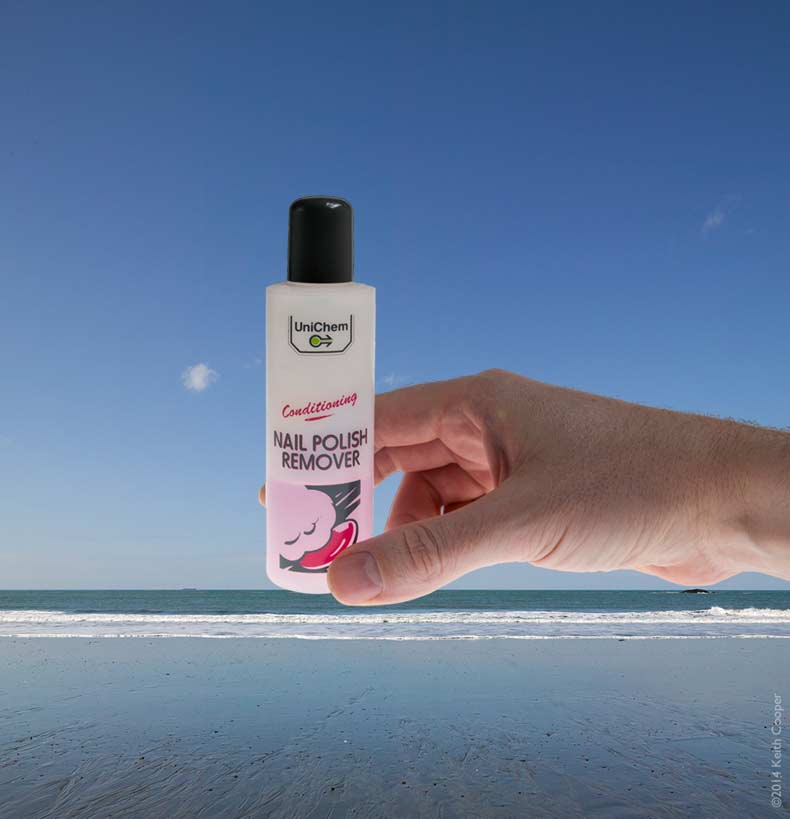
As a photographer, I don’t do a lot of cut-out work with images, but I do sometimes need to create composite images of products with new backgrounds (usually for industrial clients, rather than nail varnish).
How useful the plugin is does depend to some extent on your image editing expertise, and what package you are using it with.
There is a fully functional 30 day demo version of the software available.
The software has had a distinct overhaul from the previous version.
 This from Topaz Labs.
New in V4
- Topaz ReMask 4 has a redesigned Graphical User Interface, to improve its look and feel and usability.
- ReMask 4 re-implemented the Foreground Recovery algorithm, significantly improving its processing speed in high quality mode.
- Edge Shift feature, which is a post-processing feature that allows user to contract or expand the edges of the mask.
- Using mouse wheel to zoom in and out the image.
- Progressive brush size changes using bracket keys.
This review is based on my using Photoshop CS6, but the software works perfectly well in conjunction with other packages.
The installer will locate all suitable packages on your computer that it can work with.
Using the Plugin
There is lots of information and tutorial help for ReMask on the Topaz web site – well worth a look if you are trying it out.
ReMask works well with complex items, but to give a good example of how easy it is to use, I’ll start with this simple image – actually taken a few years ago when I was testing some lighting for transparent objects.

Opening up the plugin for the first time gives the quick overview of what to do.
You need to identify areas to keep (paint over/fill with green), areas to lose (red), and areas where you want ReMask to decide on an edge (blue).

There are few tools at the start – this is meant to be quick and simple.
Note the tabs at the top showing the source, settings and results.

After painting all round the edge, you press the ‘Compute Mask’ button, and it’s done.
Move your mouse over the image to see the computed mask.


You can zoom in and refine the mask generation overlay.
In the example below, I’ve painted a few pixels of red into the white area and re-computed the mask to cut out this gap between my fingers.

Once I’m happy with the masking, I’ve returned to Photoshop.
In this instance the cut out area has appeared as a new layer. There are a number of other options that provide the mask itself (as a layer mask). What’s best does depend on what you are doing with the image.

When I first tried this, the hairs on my hand caused the cutout edge to be a bit rough in places.
Whilst back in ReMask, I changed the check background to a solid colour (mouse over image to see) which made it a bit easier to control the edge.


Here’s the cutout dropped onto a view of the Pacific, just north of San Francisco…

That’s a fairly simple example, but the software really begins to show its power when dealing with complex shapes, such as this tree in Colorado (the colours are quite real).
I’m looking at the results in split view mode to get a feel for the initial results, before refining it using some of the colour sampling and edge refinement features.

Here’s that tree put in front of a building here in Leicester.

If you’re not familiar with such cutouts and compositing, then one thing to note is to work at as high resolution as possible for source images, then, when reducing the size of the image, you can often get a more natural looking result.
The plugin includes features for reducing colour saturation around edges, and many other refinements over just drawing a selection round objects with the pen tool…

A minor problem…
During testing, I discovered that the plugin display does not properly honour the ICC colour profile of the source image.
You can see this in the screen grab below, where the image (in Photoshop – left) is the correct colour, whilst the one in the plugin (right) looks washed out.
This is only obvious if you use a big colour space such as ProPhoto, although once you know to look, you can notice it in a smaller colour space, such as Adobe98.
— It doesn’t affect the operation of the plugin in any way —
Topaz Labs are aware of this bug and I’m told that a fix will appear in due course.
Conclusions
Buying from Topaz Labs
If you buy any software via this link (bundle or individual plugin), then we get a small fee (it costs you no more). Neither Keith Cooper nor Northlight Images has any other connection with Topaz labs whatsoever. We believe strongly in making any affiliate links like this clear.
Use our 15% discount code 'Northlight' for an additional discount on some promotions.
The plugin works quickly and effectively, making it easy to get clean edges.
The interface of V4 is simpler and tidier than before – there is no feeling of ‘let’s add a few more features’ in the design.
It does what it does, and does it well.
I like the way that there is control over the way the results of the plugin are fed back to the source program, and look forward to this functionality appearing in other Topaz plugins.
There is a fully functional 30 day demo version of the software available.
Summary
Software plugin for a wide variety of image processing functions. Comprehensive examples, tutorials and support cover usage.
Can work with a wide range of ‘hosting’ software.
We’ve reviews of all Topaz software. See the Topaz Category in the dropdown menu at the top of the right column.
System Requirements (from Topaz Labs)
Mac
- Intel-based Macs with OS 10.6, 10.7 or 10.8 (Topaz is NOT compatible with PowerPC processors – like G4 or G5.)
- 2 GB RAM minimum – preferably more
- Adobe Photoshop CS4-CS6 (32-bit and 64-bit), Adobe Photoshop Elements 6-11***.
- Apple Aperture 2 and 3, Lightroom 2-5, and iPhoto via Topaz Fusion Express
- photoFXlab ONLY – Video Card should support OpenGL 2.1 technology and later (A better video card will increase performance even more so than a faster computer processor.)
***If Photoshop Elements was bought from the Mac app store, the plugin cannot be directly copied into the plugins folder or else you will receive this message: “Cannot proceed: IPC Memory in use or image is too big for the system”. At this moment our plugins are not compatible with the Mac store’s version of PSE due to a sandboxing issue, which we are currently investigating.
Windows
- Windows XP, Windows Vista, or Windows 7 (32-bit and 64-bit), Windows 8
- 2 GB RAM minimum – preferably more
- Adobe Photoshop CS4-CS6 (32-bit and 64-bit), Adobe Photoshop Elements 6-11.
- Lightroom 2-5 via Topaz Fusion Express
- Irfanview
- PaintShop Pro
- Photo Impact
- Serif Photo Plus
- photoFXlab ONLY – Video Card should support OpenGL 2.1 technology and later (A better video card will increase performance even more so than a faster computer processor.)
There is more information at Topaz Labs
Never miss a new article or review - Sign up for our occasional (ad-free) Newsletter
and please do subscribe to Keith's YouTube Channel

Other areas of our site that may be of interest...
All the latest articles/reviews and photo news items appear on Keith's Photo blog

Keith explains tilt and shift lenses
Keith has written a book that looks at the many ways that tilt/shift lenses can benefit your photography from a technical and creative point of view. If not in the UK check for import issues and maybe try an on-line bookshop. Keith has no connection with sales of the book.
ISBN 9781785007712
There is also a specific index page on the site with links to all Keith's articles, reviews and videos about using tilt and shift.
We've a whole section of the site devoted to Digital Black and White photography and printing. It covers all of Keith's specialist articles and reviews. Other sections include Colour management and Keith's camera hacks - there are over 1200 articles/reviews here...
Adverts removed