


PhotoSweeper – cleaning up photo libraries
Review: Photosweeper, for cleaning photo collections
Software helps clean up and remove duplicates from libraries and collection of photos
Mac software tidies up image collections.

Keith has removed all Google ads. Too many deceptive and irritating adverts.
Any ad links left are non tracking, to companies we know, trust and we've worked with for years [Park Cameras]
Ads helped pay for site running costs, so if you found something useful, please
...Make small KoFi donation?
...Subscribe to Keith's YouTube Channel
...Get Keith's book about how to use tilt/shift lenses
Our site contains affiliate links - these help support the site. See our Advertising policies for more
Remove and sort duplicate or similar images in your image libraries

I get to look at a lot of bits of photo software, which vary widely in function and usability.
A (Mac) application that will quickly sort through Lightroom, Aperture and iPhoto image libraries, or folders of images and locate duplicates and similar files (by time or by image content for example).
The software was downloaded from Apples ‘app’ store – there is more info at the PhotoSweeper web site. I note that there are demo versions , and if you are feeling particularly miserly, a ‘lite’ version at $3.
Given I don’t use any of those applications, what use is it to me? Well, it does also sort through folders of images, which I use in a hierarchical structure for the well over 100,000 images in my collection. However duplicates are not an issue…
So, why look at it? Well I used to do research into software usability amongst other things, and for a $10 bit of software it impressed me with its simplicity and clear design. From my POV, good software often does a few things very well. If you’ve lots of images in different libraries on a Mac, then this might work well for you…
On startup, there are plenty options to select the photos to compare.

Initial startup options
I’ve loaded my ‘Assorted pics’ folder – these are image I’ve posted on G+, forums or even used in some article posts. Although all the original source are likely filed by date somewhere, these are just assorted ones left in a sort of digital shoebox ;-)
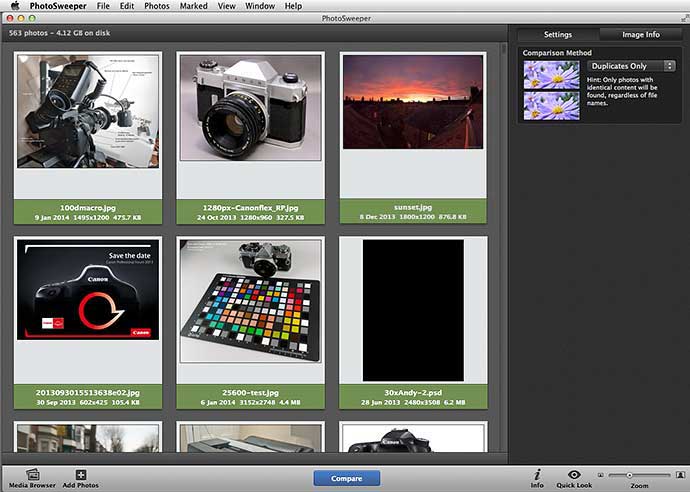
Adding a collection of images from a folder
The program does a good job in handling different image formats, although there are no previews for .psd Photoshop files.
Comparisons can be made on a choice of image content and time parameters.

Looking at timings and creation dates
Duplicate dates are the quickest to spot, so it’s best to start there – the time interval setting.

Different factors to consider before flagging a match
The time doesn’t have to be identical, so would be good for finding all images taken at a particular location, if you were only there for a while.
If you want to compare by image content, there are a number of ways of controlling just how similar images need to be.

You can refine the ways that the software looks for matching images
A quick initial time check finds two duplicates, and allows me to specify if they are to be automatically marked.
In this instance I can see that for some reason I’ve pasted a load of text into the files name (??) – it’s the same file, so pretty obvious I don’t need the one with the odd name.

Duplicate marking can be automated
Where the auto marking comes in is if you’ve got photos in multiple libraries or with different features/tags.
The precedence of all these rules can be easily promoted/demoted

Details about what you want marked as a duplicate
Note how in this instance, images in a Lightroom library are ranked higher than in any iPhoto library.
I take photos in RAW and JPEG format at the same time in my cameras, leading automatically to 100,000+ duplicates in my archive folders.
However in the General preferences, things like this are allowed for.
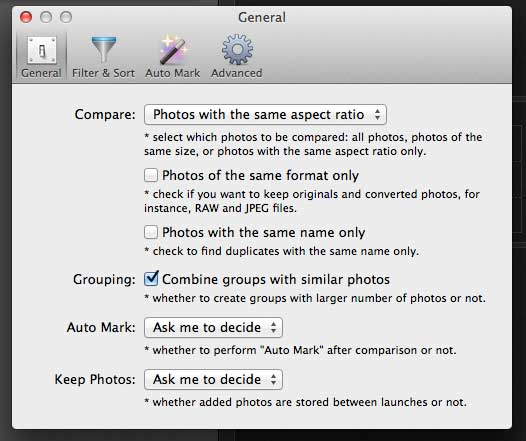
Program options
Just because a duplicate is marked, the default action is that you need to decide to delete it.
Files are only ever moved to the trash, whilst in Lightroom, they are moved to special ‘Rejected’ collection.
There is a histogram and metadata display available for any image, and you can also have a more detailed look at the file itself.

Full information about the selected image
I can also move files around and there is a batch renaming feature
If you compare by content, you can see the low res blurred thumbnails that the program can use for quick comparisons – these whiz by at quite a speed. It only took a few seconds to run through the 70+ images in this folder.

Versions of the images are scanned against each other
The program also groups similar images – the creation dates have flagged the similarities here.
Note too that my star ratings (from Adobe Bridge) have been picked up. In this case I look at the third wind turbine picture and wonder why it’s there…
I did say that this particular folder of image was akin to a shoebox for storing old pictures ;-)

Files can be grouped by similarity
So, a nifty bit of software that essentially does what it says.
It doesn’t fit in my own particular workflow, but I know that a lot of people do find problems with maintaining image libraries between multiple apps.
Give it a go – it’s free to try and is excellent value to buy…
See the PhotoSweeper web site for a lot more info
Selected features
- iPhoto – Fully compatible with the latest iPhoto 9, iPhoto 8.x (iLife ’09) and iPhoto 7.x (iLife ’08). Duplicate photos are moved to the iPhoto Trash.
- Aperture – Fully compatible with Aperture 3.0 and later. PhotoSweeper can help you to migrate from iPhoto to Aperture by eliminating duplicates between libraries.
- Adobe Lightroom – Works with Lightroom 3.x…5x. On removal, PhotoSweeper doesn’t delete files, but marks them as “Rejected” and puts to a special collection.
- Edited Photos – Finds duplicates with different image dimensions, colour saturation, and even edited with applications, such as PhotoShop, PixeLmator, etc.
- Video – PhotoSweeper compares video files as well. You can add video files not only from your Mac, but also from iPhoto, Aperture and Lightroom.
- Safe Removal – PhotoSweeper never deletes photos from disk or media library permanently. So if you removed them accidentally, you are always able to restore them from Trash.
Never miss a new article or review - Sign up for our occasional (ad-free) Newsletter
and please do subscribe to Keith's YouTube Channel

Other areas of our site that may be of interest...
All the latest articles/reviews and photo news items appear on Keith's Photo blog

Keith explains tilt and shift lenses
Keith has written a book that looks at the many ways that tilt/shift lenses can benefit your photography from a technical and creative point of view. If not in the UK check for import issues and maybe try an on-line bookshop. Keith has no connection with sales of the book.
ISBN 9781785007712
There is also a specific index page on the site with links to all Keith's articles, reviews and videos about using tilt and shift.
We've a whole section of the site devoted to Digital Black and White photography and printing. It covers all of Keith's specialist articles and reviews. Other sections include Colour management and Keith's camera hacks - there are over 1200 articles/reviews here...
We're an Amazon.com affiliate, so receive payment if you buy via Amazon US