


Using the new i1Pro 2 for profiling
Using the new i1Pro 2 for profiling
Profiling with the X-rite i1Pro 2

No more Google ads. Too many deceptive and irritating adverts.
Any ad links left are non tracking, to companies we know, trust and we've worked with for years [Park Cameras]
Ads helped pay for site running costs, so if you found something useful, please
...Make small KoFi donation?
...Subscribe to Keith's YouTube Channel
...Get Keith's book about how to use tilt/shift lenses
Our site contains affiliate links - these help support the site. See our Advertising policies for more
 Colour management with the X-Rite i1 Pro 2
Back in April I noted X-Rite’s launch of their new spectrophotometer, the i1Pro 2.
Since then I’ve been trying out the equipment and software, calibrating monitors and projectors and building ICC printer profiles.
One of the difficulties of reviewing products that do so much, is how to do them justice, without ending up with reviews the size of small books…
As such I’ve produced two initial reviews covering the i1Basic Pro 2 and i1Photo Pro 2 packages.
Review Link: i1Basic Pro 2 – monitor and projector profiling
Review Link: i1Photo Pro 2 – Printer profiling (RGB) and profiling with Optical Brightener Compensation
The i1Profiler software provides a number of different ways of calibrating and profiling displays, suitable for a range of user needs.
The default ‘basic’ settings are fine for most photographers, and I always tell people that if they find a feature in the advanced settings that they don’t know what it does, then that’s a big hint that they probably don’t need it (of course I’d always encourage finding out why).

i1Pro 2 and MacBook Pro, ready for profiling display
Printer profiles are made by measuring printed out coloured patches. The software knows what it told the printer to produce and it knows from the measurements, what actually came out. This difference forms the basis of building your ICC printer profile.
The ruler and base have been redesigned and are both easier to use and more reliable in use.
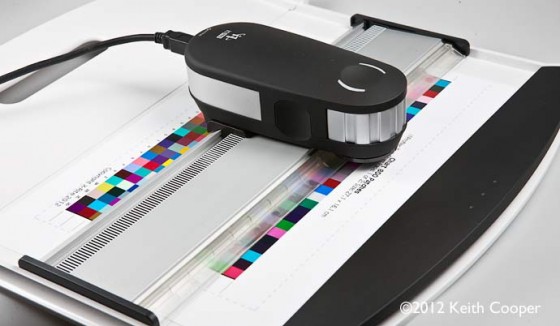
Reading a printer profiling target with the i1Pro 2
If you add in the new measurement modes available with the i1Pro 2, and the ability to compensate for the presence of Optical Brighteners (OBAs) in papers when profiling, then the new version is a welcome jump in performance and capability.
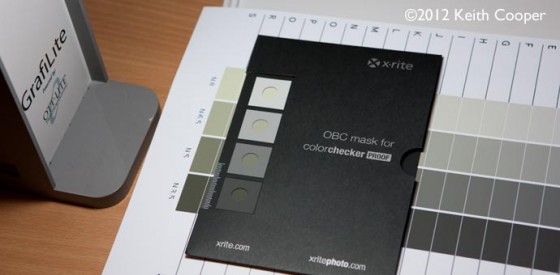
Checking a paper, before compensating for OBAs during profiling
I’ll be writing more articles and reviews in the coming months covering using the i1Pro 2 in other colour management applications.
[contentblock id=43 img=html.png]
Never miss a new article or review - Sign up for our Newsletter (2-4 a month max.)
More colour management and printing related information
For information about printers, paper reviews and profiling (colour management) see the Printing section of the main printers and printing page, or use the search box at the top of any page.
All colour management articles and reviews are indexed on the main Colour Management page - please do let Keith know if you've any questions, either via the comments or just email us?
Some specific articles that may be of interest:
- Why don't my prints match my screen? A short article showing why there is more to getting your prints to match your screen, than just calibrating your monitor. It's the vital first step, but you do need to consider some other factors for best results.
- Why are my prints too dark - some basic suggestions to this common problem.
We're an Amazon.com affiliate, so receive payment if you buy via Amazon US